
One-Click Meeting Links for Google & Outlook
Overview
The Fugu Meetings extension is designed to streamline the process of scheduling meetings across Google Calendar and Outlook Calendar. By integrating directly into these widely used calendar platforms, it allows users to generate meeting links with a single click, reducing time spent on manual setup. This tool is particularly useful for professionals who frequently coordinate with clients, team members, or remote collaborators across different time zones.
It targets individuals and teams in business, education, and project management who rely on consistent, efficient scheduling. The extension aims to eliminate friction in the meeting preparation workflow, ensuring that participants receive a ready-to-use link without additional steps. Its lightweight design and focus on core functionality suggest an emphasis on speed and simplicity.
Developed by Fugu, the tool is positioned as a productivity enhancer for users who value efficiency. While specific details about the company’s background were not provided, the extension’s release date of May 15, 2024, indicates it is a recent addition to the productivity tool ecosystem. Real-world usage includes quick setup for team stand-ups, client consultations, and recurring project check-ins.
Key Features & Capabilities
- One-Click Meeting Link Generation – Instantly create a meeting link directly from Google Calendar or Outlook Calendar events, minimizing setup time.
- Seamless Integration – Works directly within the calendar interface without requiring external apps or logins.
- Support for Multiple Platforms – Compatible with both Google Calendar and Outlook Calendar, catering to diverse user environments.
- Lightweight Design – At just 2.1 MB, the extension is optimized for minimal system impact.
- Secure Link Handling – Ensures meeting links are generated securely within the browser context.
Users can leverage this tool during event creation or editing, saving time when scheduling recurring or one-time meetings. For example, a project manager can generate a Zoom or Teams link instantly while setting up a weekly review. Similarly, a consultant can provide a ready-to-join link to a client during a calendar invite, improving response rates and reducing scheduling delays.
The extension’s focus on simplicity means it avoids unnecessary features, making it ideal for users who want a reliable, no-frills solution. It does not require additional configuration, allowing immediate use after installation.
User Interface, Workflow & Performance
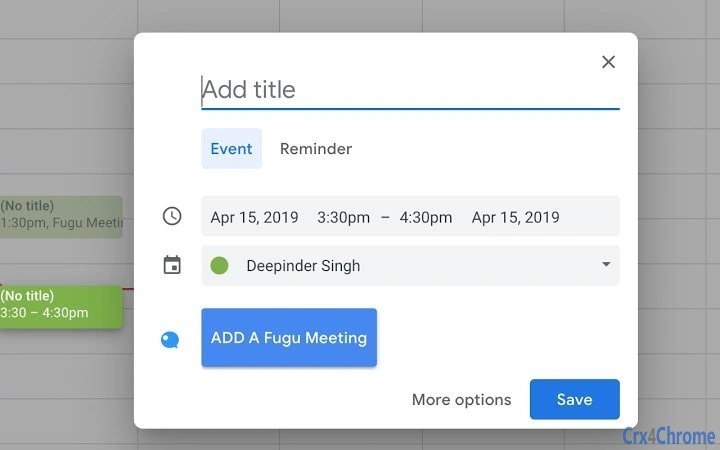
The user interface of the Fugu Meetings extension is designed for minimal disruption. It appears as a small button or icon within the calendar event creation or editing interface, clearly labeled for easy identification. Navigation is intuitive, with no complex menus or settings required. Users can access the feature directly from the event form, making it accessible even during time-sensitive scheduling.
Workflow efficiency is enhanced by the one-click mechanism. Once installed, the extension activates automatically when a user opens a calendar event. The action is instantaneous, with no visible lag or loading screens. This suggests optimized code execution and efficient use of browser resources.
The developer did not specify resource usage details. However, given the extension’s size of 2.1 MB and its limited functionality, it is expected to have a low impact on CPU and RAM usage. Stability appears to be a priority, as the tool operates within the secure sandbox of the browser environment, reducing the risk of system conflicts.
Compatibility & System Requirements
Fugu Meetings is compatible with Windows and Mac operating systems, supporting both Google Chrome and Microsoft Edge browsers. The extension is available as a browser add-on, meaning it runs within the context of the user’s web browser rather than as a standalone desktop application.
Installation size is 2.1 MB, which is minimal for a browser extension. This suggests it does not require significant disk space or memory during operation. The developer did not provide additional system requirements, such as minimum RAM, processor speed, or specific browser versions.
Exact system requirements were not listed. Compatibility information is limited to the operating systems and the fact that it functions as a browser extension. Users should ensure their browser is up to date to maintain optimal functionality.
Pros and Cons
Pros
- One-click generation of meeting links for Google Calendar and Outlook
- Lightweight at just 2.1 MB
- Simple, intuitive interface with no learning curve
- Secure operation within the browser environment
- Free to use with no hidden costs
Cons
- Only available as a browser extension, not a standalone desktop app
- No detailed system requirements provided
- Functionality limited to meeting link generation (no scheduling intelligence)
- Dependent on browser availability and updates
FAQ Section
Is Fugu Meetings compatible with all browsers?
The extension is designed for Google Chrome and Microsoft Edge. Compatibility with other browsers was not specified.
Is the extension safe to use?
Yes, the extension operates within the browser’s security sandbox and does not access sensitive data beyond the calendar context.
How often does the extension update?
Updates are released by the developer as needed. Users are encouraged to keep the extension up to date for optimal performance.
Can I use Fugu Meetings offline?
Since it is a browser extension, it requires an active internet connection to function.
What kind of license does Fugu Meetings have?
The extension is free to use and does not require a license key or subscription.
Final Thoughts + CTA
Fugu Meetings delivers a focused, efficient solution for users who need to generate meeting links quickly and reliably. Its one-click functionality, combined with support for both Google Calendar and Outlook, makes it a valuable tool for professionals managing high-volume schedules. The lightweight design and secure operation further enhance its appeal.
While it lacks advanced features like automated time zone detection or calendar intelligence, its simplicity is its strength. It serves best as a complementary tool for users already invested in Google and Outlook ecosystems.
For anyone seeking a fast, free, and secure way to streamline meeting setup, Fugu Meetings is a strong contender. Download Fugu Meetings now.







